> For the complete documentation index, see [llms.txt](https://docs.verygoodsecurity.com/llms.txt). Markdown versions of documentation pages are available by appending `.md` to page URLs; this page is available as [Markdown](https://docs.verygoodsecurity.com/vault/developer-tools/vgs-collect/js/fraud-prevention-sardine.md).
# Integration with Sardine
[Sardine.ai ](https://www.sardine.ai/)is a comprehensive risk and fraud prevention system that incorporates third-party data sources, such as email, phone verification, and location, with proprietary behavioral analytics. This integration enables the platform to efficiently prevent identity and payment fraud, as well as account takeover attempts.
## What is Risk SDK?
Accurate identification of the device used and user behavior during a session is crucial for risk assessment. Sardine's proprietary technology excels at performing this task and plays a vital role in identifying potential hazards associated with devices, behaviors, and tools used during these sessions. Such tools include, but are not limited to, VPNs, emulators, and remote desktop protocols, among others.
Risk SDK can now track and analyze the behavior of the secure VGS Collect fields.
## Prerequisites
* Account with [Sardine](https://dashboard.sandbox.sardine.ai/).
* Sardine's API keys (client\_id/client\_secret).
## Integration with VGS Collect.js
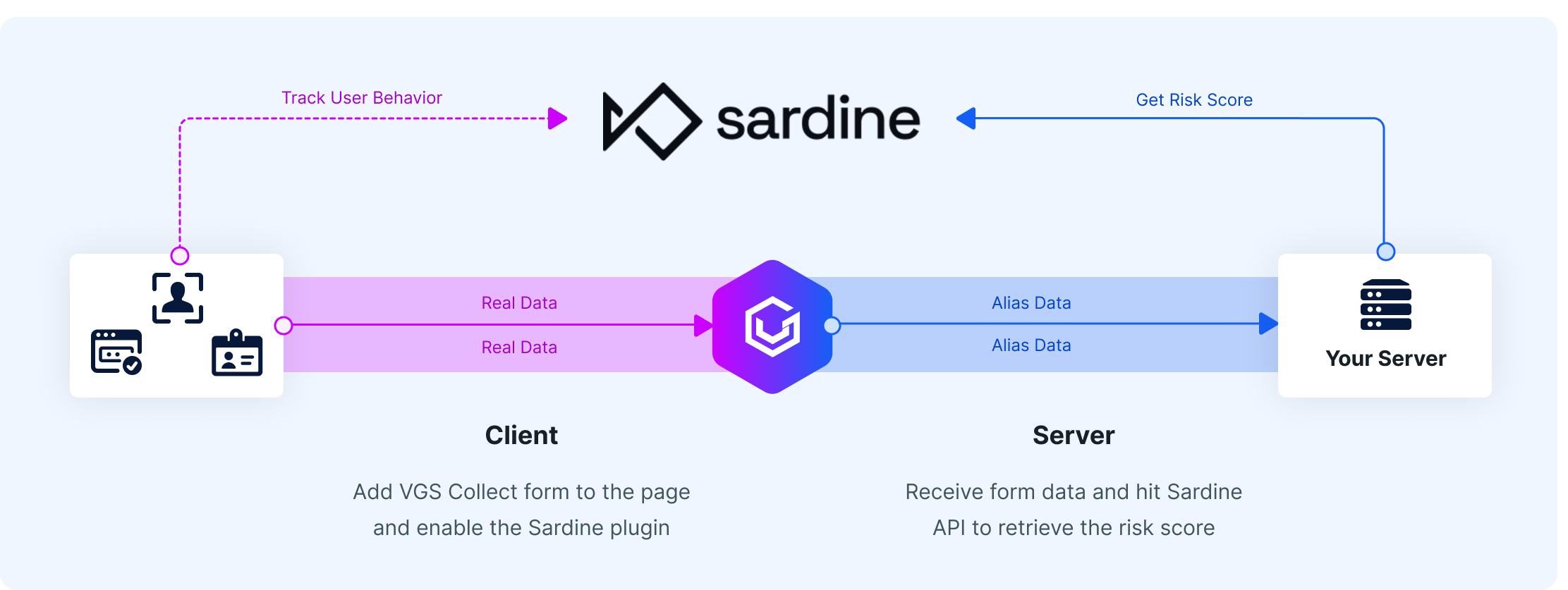
Integration consists of two essential parts:
* Track form behavior on the client side.
* Retrieve the risk score based on the session on the server side.
### Client Side Integration
To integrate VGS Collect, include its script in the desired page and activate the Sardine plugin as early as possible. It will load Sardine's script under the hood and set secure fields for the Risk SDK's context. Create a unique session key using a UUID generator that will be linked to the user's session and will be utilized to obtain the risk score from your application.
Configure the VGS Collect form with the desired fields and add the generated session key to the request payload:
```javascript
const form = VGSCollect.create('', '', (state) => {});
const sessionKey = window.crypto.randomUUID();
form.setPlugin({ name: 'sardine', environment: 'sandbox' }, {
clientId: $SARDINE_CLIENT_ID,
sessionKey,
});
const cardNumber = form.field('#card-number-frame', {
name: 'cc-number',
type: 'card-number',
placeholder: 'Card number',
validations: ['required', 'validCardNumber'],
autoComplete: 'cc-number',
});
const cardSecurityCode = form.field('#cvv-frame', {
name: 'card-security-code',
type: 'card-security-code',
placeholder: 'Card Security Code',
validations: ['required', 'validCardSecurityCode']
});
mySubmitButton.addEventListener('click', (e) => {
e.preventDefault();
form.submit('/post', {
data: { sessionKey },
},
(status, data) => {}
);
});
```
### Server Side Integration
From your server, you can trigger varying device risk levels using the sessionKey value when posting to the `/v2/devices` API. The response will contain the riskiness of the session: (`very_high`, `high`, `medium`, `medium_low`, `low`):
{% code title="Request" %}
```bash
curl --request POST \
--url https://api.sandbox.sardine.ai/v2/devices \
--header 'Authorization: Basic $SARDINE_CLIENT_ID:$SARDINE_SECRET_KEY' \
--header 'Content-Type: application/json' \
--data '{
"sessionKey": $SESSION_KEY,
}'
```
{% endcode %}
{% code title="Response" %}
```javascript
{
"id": "5d5e4327-af0f-4326-a91c-c02ec4be8dc8",
"level": "low",
"attributes": {
"Browser": [
"Chrome"
],
"Model": [
""
],
"OS": [
"Mac OS X"
]
},
"signals": [
{
"key": "TrueOS",
"value": "Mac/iOS"
},
{
"key": "DeviceAgeHours",
"value": "5120"
},
{
"key": "TrueIP",
"value": "107.3.145.172"
},
{
"key": "VPN",
"value": "low"
},
{
"key": "Proxy",
"value": "low"
},
{
"key": "RemoteSoftwareLevel",
"value": "low"
},
{
"key": "OSAnomaly",
"value": "low"
},
{
"key": "Emulator",
"value": "false"
},
{
"key": "IpType",
"value": "Fixed Line ISP"
}
],
"sessionKey": "apidoc00-0e3a-47b3-9fea-ec72a5example",
"fingerprint": "2473f843-13ab-40e0-abf9-32d5ffbf38a4",
"fingerprintConfidenceScore": 93,
"behaviorBiometricRiskLevel": "low",
"deviceReputation": "unknown",
"behaviorBiometrics": {
"hesitationPercentile": {
"nonLtm": 0,
"ltm": 0
},
"numDistractionEvents": 0,
"fields": [
{
"name": "p",
"numCopyPasteEvents": 0,
"numClipboardEvents": 0,
"numAutoFillEvents": 0,
"numExpertKeyEvents": 0,
"hesitationPercentage": 0,
"isLTM": true,
"timeSpendInMsEvents": [
914
]
},
{
"name": "u",
"numCopyPasteEvents": 0,
"numClipboardEvents": 0,
"numAutoFillEvents": 0,
"numExpertKeyEvents": 0,
"hesitationPercentage": 0,
"isLTM": true,
"timeSpendInMsEvents": [
900
]
}
]
},
"ipLocation": {
"city": "Palo Alto",
"region": "California",
"country": "US",
"latitude": "37.44",
"longitude": "-122.14"
},
"gpsLocation": {
"city": "Palo Alto",
"region": "California",
"country": "US",
"latitude": "37.44",
"longitude": "-122.14",
"mockLevel": "high"
},
"checkpoints": {
"device": {
"riskLevel": {
"value": "medium",
"ruleIds": [
215,
277
]
}
}
}
}
```
{% endcode %}
---
# Agent Instructions
This documentation is published with GitBook. GitBook is the documentation platform designed so that both humans and AI agents can read, navigate, and reason over technical content effectively. Learn more at gitbook.com.
## Querying This Documentation
If you need additional information that is not directly available in this page, you can query the documentation by asking a question.
Perform an HTTP GET request on the following URL with the `ask` and `goal` query parameters:
```
GET https://docs.verygoodsecurity.com/vault/developer-tools/vgs-collect/js/fraud-prevention-sardine.md?ask=&goal=
```
`ask` is the immediate question: it should be specific, self-contained, and written in natural language.
`goal` is what the user is ultimately trying to achieve, the reason they need the answer. Sharing it helps GitBook give you a better, more relevant answer. A goal is most helpful when it describes the outcome the user wants rather than restating the question. For example, with `ask=how do I create an API token`, a goal like `automate deployments from our CI pipeline` lets GitBook tailor the answer to that use case.
The response will contain a direct answer to the question and relevant excerpts and sources from the documentation.
Use this mechanism when the answer is not explicitly present in the current page, you need clarification or additional context, or you want to retrieve related documentation sections.