> For the complete documentation index, see [llms.txt](https://docs.verygoodsecurity.com/llms.txt). Markdown versions of documentation pages are available by appending `.md` to page URLs; this page is available as [Markdown](https://docs.verygoodsecurity.com/vault/storage.md).
# Persistent And Volatile Storage
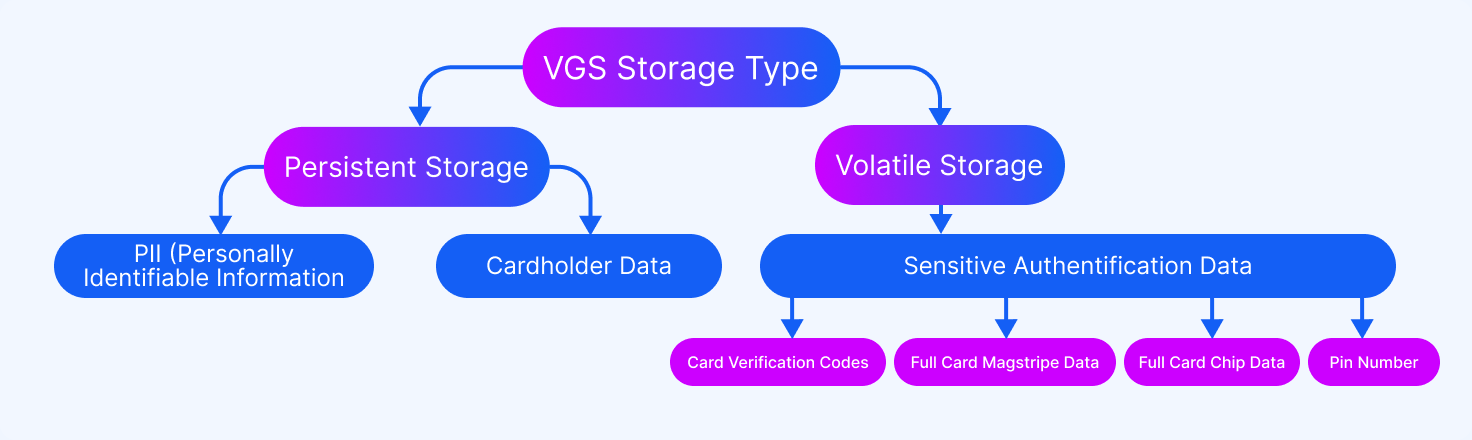
VGS supports two different types of storage, Persistent and Volatile. Persistent storage allows you to store your data with VGS on a permanent basis, such as credit card numbers, account numbers, and Personally Identifiable Information. When card or account numbers are stored in conjunction with names, service codes, and expiration dates, they are considered Cardholder Data. PCI DSS requires Cardholder Data to be protected when stored with card or account numbers, and may be stored in Persistent Storage.
There is a second category of data called Sensitive Authentication Data, which includes:
* Full Card Magstripe Data
* Full Card Chip Data
* Card Verification Codes
* PIN Numbers
To be PCI compliant, Sensitive Authentication Data cannot be stored in persistent storage, even if it is encrypted. Sensitive Authentication Data must be stored in **volatile storage**, and it must be deleted after the authorization for which it was collected is completed.
To remain compliant, VGS stores Sensitive Authentication Data in Volatile Storage for a predetermined amount of time. The default holding period for volatile storage is 1 hour, although this can be reconfigured with some constraints.
Volatile Storage must be selected on both the Inbound and Outbound routes.
You will not be able to reveal data that was redacted in Volatile Storage on your Inbound Route if your Outbound Route is set to reveal that field, but has Persistent Storage selected. In the event that you attempt to reveal data that was held in volatile storage that is no longer available, the VGS Alias passed to the request is returned in the corresponding field instead, as there is no unredacted data to reveal.
---
# Agent Instructions
This documentation is published with GitBook. GitBook is the documentation platform designed so that both humans and AI agents can read, navigate, and reason over technical content effectively. Learn more at gitbook.com.
## Querying This Documentation
If you need additional information that is not directly available in this page, you can query the documentation dynamically by asking a question.
Perform an HTTP GET request on the current page URL with the `ask` query parameter, and the optional `goal` query parameter:
```
GET https://docs.verygoodsecurity.com/vault/storage.md?ask=&goal=
```
`ask` is the immediate question: it should be specific, self-contained, and written in natural language.
`goal` is optional and describes the broader end goal you are ultimately trying to accomplish on behalf of the user. GitBook uses it to tailor the answer towards what is most useful for that goal.
The response will contain a direct answer to the question and relevant excerpts and sources from the documentation.
Use this mechanism when the answer is not explicitly present in the current page, you need clarification or additional context, or you want to retrieve related documentation sections.