# Create Card - Apple Pay Wallet Decryption

### Overview

CMP supports Apple Pay Wallet Decryption, allowing merchants to submit an encrypted Apple Pay payment token directly to CMP during card creation. CMP decrypts the token using an Apple-compliant key, extracts the DPAN or MPAN, creates and securely stores the card, and returns the created card object in the API response.

This feature is designed for merchants who have already obtained the encrypted Apple Pay payment token from the customer’s device and want CMP to handle decryption and card creation. The encrypted wallet token must be generated through the standard Apple Pay flow before calling the Create Card API. If you need guidance on generating encrypted Apple Pay tokens for testing, see the Wallet Decrypt [Testing Guide her&#x65;**.**](https://docs.verygoodsecurity.com/cmp/developer-resources/guides/testing/wallet-decrypt)

The `pan` field in the response contains the decrypted DPAN or MPAN, not the original FPAN. Tokenization behavior remains consistent with CMP: PCI-scoped clients receive both PAN and PAN alias, while non-PCI clients receive only the PAN alias. The presence of PAN in the response does not mean tokenization is bypassed.

### Benefits

* No need to build or maintain Apple Pay decryption services
* Reduced PCI scope
* Standardized handling of wallet metadata
* Continued access to CMP vaulting and card fingerprinting

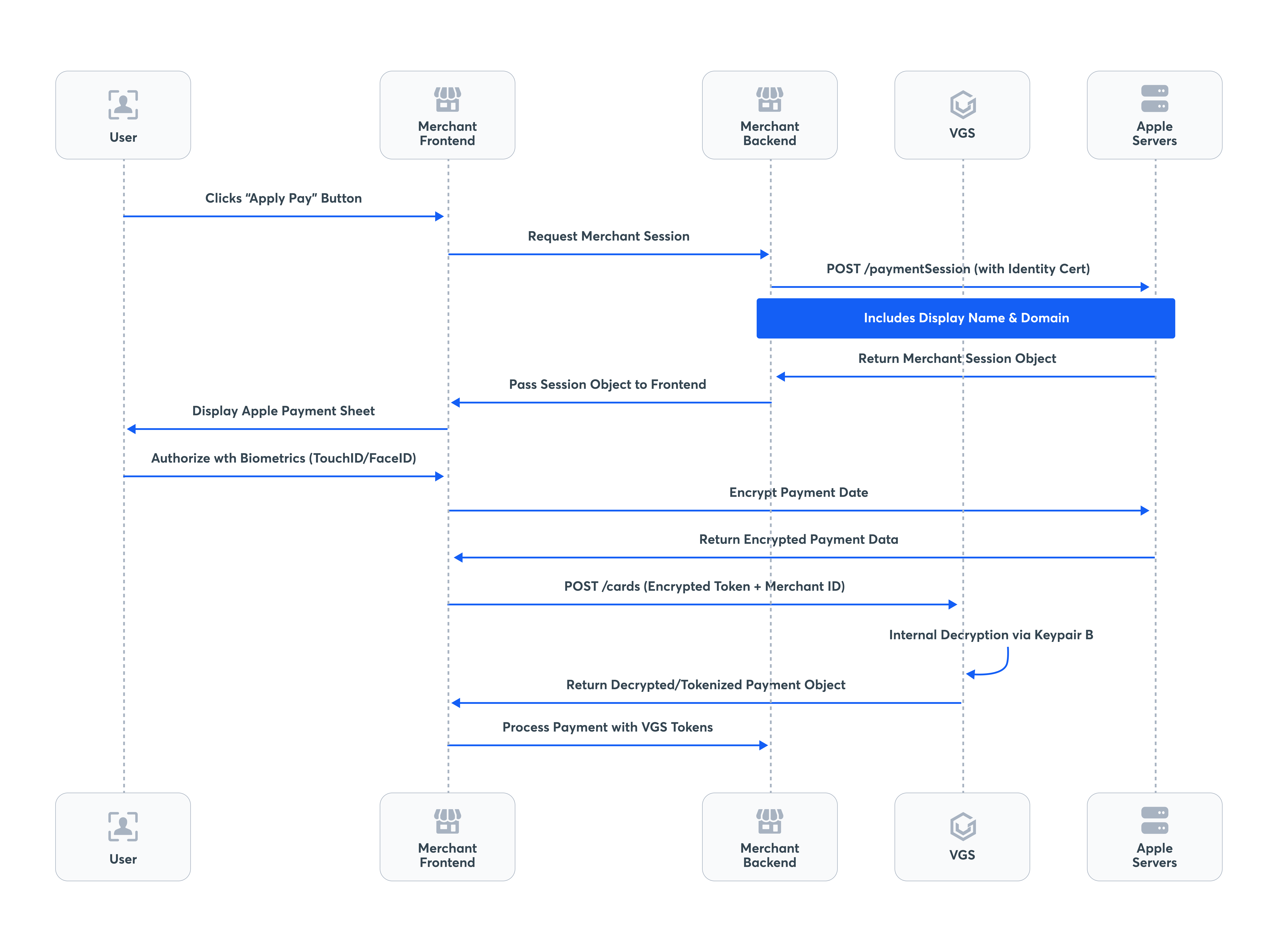
### Apple Pay wallet decryption flow

After the merchant session is established and the customer authorizes the payment, the encrypted Apple Pay token can be submitted to CMP for decryption and card creation.

#### Flow overview

* The customer selects Apple Pay during checkout.
* The merchant frontend creates and begins the Apple Pay session.
* The merchant backend completes Apple merchant validation and returns the merchant session object to the frontend.
* The customer authorizes the payment in the Apple Pay sheet.
* Apple returns encrypted payment data to the merchant frontend.
* The merchant backend submits the encrypted Apple Pay token to CMP using the Create Card API.
* CMP decrypts the token using the configured Apple Pay payment processing certificate.
* CMP extracts the wallet token and related card metadata.
* CMP creates and stores the card.
* CMP returns the created card object and associated wallet metadata.

#### Apple Pay wallet decryption sequence

<figure><img src="https://236204706-files.gitbook.io/~/files/v0/b/gitbook-x-prod.appspot.com/o/spaces%2Fg1pA9re6lCmtaiQAnvjh%2Fuploads%2FODOEQIlJHai9EfTb8QS3%2Fimage.png?alt=media&#x26;token=82a00022-775e-42eb-b662-5293049d9255" alt=""><figcaption></figcaption></figure>

### Setting Up Your Apple Certificates

To use Apple Pay Wallet Decryption with CMP, you must configure the Apple Pay certificates required for your integration. Depending on your setup, this may include a Merchant Identifier, a Payment Processing Certificate, and a Merchant Identity Certificate.

Before generating certificates or uploading Apple-signed certificates to VGS, make sure the VGS CLI is installed and authenticated.

#### Getting Your Vault ID

To generate and upload certificates, you need your VGS Vault ID. **Work with your VGS customer representative to obtain your Vault ID.**

#### VGS CLI Setup

```
pip install vgs-cli
vgs login
```

#### Create a Merchant Identifier

Create a Merchant Identifier in your Apple Developer account for the Apple Pay integration you plan to use with CMP. The Merchant Identifier represents your Apple Pay merchant configuration and is required when creating Apple Pay certificates.

Apple requires the Merchant Identifier to follow reverse domain notation, for example `merchant.com.yourcompany.appname`. Identifiers that do not follow this format may be rejected by the Apple Developer portal.

Use the Merchant Identifier that corresponds to the integration you intend to test or use in production. You will reference this identifier when creating both the Payment Processing Certificate and, if needed, the Merchant Identity Certificate.

#### Create a Merchant Identity Certificate

The Merchant Identity Certificate is used for merchant validation in Apple Pay on the web. This certificate is not used to decrypt payment payloads, but it is required if your integration performs merchant session validation, such as Apple Pay on the web.

This certificate is separate from the Payment Processing Certificate flow.

**Step 1: Generate the CSR**

Use the VGS CLI to generate the CSR for the Apple Pay Merchant Identity Certificate:

```
vgs certificate generate-csr \
  -V <VAULT_ID> \
  --type apple-pay-merchant-identity \
  --name merchant.com.example \
  -o merchant_identity.csr
```

Replace:

* `<VAULT_ID>` with your VGS vault ID
* `merchant.com.example` with your Apple Merchant Identifier

**Step 2: Upload the CSR to Apple**

Upload the generated `.csr` file to the Apple Developer portal under the Merchant Identity Certificate section for your Merchant Identifier.

The generated CSR is uploaded to Apple, not to VGS. There is no separate command to upload the CSR back into VGS.

**Step 3: Upload the Apple-signed certificate to VGS**

After Apple signs the certificate and provides the `.cer` file, upload the Apple-signed certificate back to VGS.

Using certificate ID:

```
vgs certificate upload \
  -V <VAULT_ID> \
  --cert-id <CERT_ID> \
  -f apple_signed_cert.cer
```

You only need this certificate if your Apple Pay integration requires merchant validation, such as Apple Pay on the web.

#### Create a Payment Processing Certificate

The Payment Processing Certificate is required for Apple Pay token decryption. CMP uses this certificate to decrypt the encrypted Apple Pay payment token submitted through the Create Card API.

To set this up, generate a certificate signing request (CSR) using an ECC (Elliptic Curve Cryptography) key. CMP supports `EC_v1` tokens only, which requires an ECC-based CSR. VGS does not support RSA-based certificates. Apple’s portal may accept an RSA-based CSR without error, but the resulting certificate cannot be used with CMP and decryption will fail at runtime.

**Step 1: Generate the CSR**

Use the VGS CLI to generate the CSR for the Apple Pay Payment Processing Certificate:

```
vgs certificate generate-csr \
  -V <VAULT_ID> \
  --type apple-pay-payment-processing \
  --name merchant.com.example \
  -o payment_processing.csr
```

Replace:

* `<VAULT_ID>` with your VGS vault ID
* `merchant.com.example` with your Apple Merchant Identifier

**Step 2: Upload the CSR to Apple**

Upload the generated `.csr` file to the Apple Developer portal when creating your Apple Pay Payment Processing Certificate.

The generated CSR is uploaded to Apple, not to VGS. There is no separate command to upload the CSR back into VGS.

**Step 3: Upload the Apple-signed certificate to VGS**

After Apple signs the certificate and provides the `.cer` file, upload the Apple-signed certificate back to VGS.

Using certificate ID:

```
vgs certificate upload \
  -V <VAULT_ID> \
  --cert-id <CERT_ID> \
  -f apple_signed_cert.cer
```

Once this certificate is uploaded to VGS, it can be used to decrypt Apple Pay payment payloads sent through the Create Card API. CMP identifies the correct certificate using the `key_hash` value included in the encrypted request payload.

### Create the Apple Pay Merchant Session

Before the encrypted Apple Pay token can be submitted to CMP, the merchant must initialize and validate an Apple Pay session in the browser.

A typical merchant session flow is:

* Register and verify your web domain with Apple: The domain association file must be hosted on each domain that will use Apple Pay, and each domain or subdomain must be registered and verified separately with Apple.
* The customer clicks the Apple Pay button.
* Create an `ApplePaySession` in the frontend using an `ApplePayPaymentRequest`: This must be done synchronously inside a user gesture handler, such as a click or tap event. Do not create the session after asynchronous work, such as an `await`, promise resolution, or callback, because it may no longer be considered part of the original user gesture. If the session is created outside a user gesture handler, Safari throws a JavaScript exception and the Apple Pay sheet does not open. The error message is: `Must create a new ApplePaySession from a user gesture handler`.
* Populate the Apple Pay payment request: The payment request includes values such as:
  * `merchantIdentifier` — your registered Merchant Identifier
  * `countryCode` and `currencyCode`
  * `supportedNetworks`
  * `merchantCapabilities` — include `supports3DS`, which Apple requires for standard card payments
  * `total`
  * optional line items
* Handle merchant validation: The Apple Pay session triggers merchant validation and provides a `validationURL` in the `onvalidatemerchant` event. The frontend sends this `validationURL` to the merchant backend. The server-side merchant validation flow must use the `validationURL` provided by the event.
* Request the merchant session from the backend: The merchant backend sends a POST request to the `validationURL` to obtain the merchant session object. This request must be made from your server, not the client, as it requires your Merchant Identity Certificate for mutual TLS authentication.
* Complete merchant validation in the frontend: Apple returns a merchant session object. The backend passes it to the frontend, which calls `session.completeMerchantValidation(merchantSession)` to complete validation and enable the Apple Pay sheet. The merchant session object is single-use and expires after five minutes.
* The customer authorizes the payment: The customer uses Face ID, Touch ID, or device passcode to authorize.
* Receive the encrypted Apple Pay payment token: The `onpaymentauthorized` event returns the Apple Pay payment data, including the encrypted payment token.
* Submit the encrypted payment data to CMP: The frontend passes `event.payment.token.paymentData` to the merchant backend, which submits it to CMP. CMP uses the configured Payment Processing Certificate to decrypt the token, extract the wallet card data, create and securely store the card, and return the created card object.

### Create Card request

To use Apple Pay Wallet Decryption, submit the encrypted Apple Pay payment token in the Create Card request instead of a decrypted PAN.

CMP uses the `key_hash` field to identify the correct Apple Pay payment processing certificate for decryption.

#### **Apple Pay token to CMP field mapping**

When constructing the Create Card API request, map the fields from `event.payment.token.paymentData` as follows:

| Apple Pay token field                   | CMP API field            | Notes                                                                                                        |
| --------------------------------------- | ------------------------ | ------------------------------------------------------------------------------------------------------------ |
| `paymentData.data`                      | `encrypted_payload_text` | Base64-encoded encrypted payload                                                                             |
| `paymentData.header.publicKeyHash`      | `key_hash`               | Used by CMP to identify the correct Payment Processing Certificate. Do not confuse with `ephemeralPublicKey` |
| `paymentData.header.ephemeralPublicKey` | `public_key`             | The ephemeral EC public key for this transaction                                                             |
| `paymentData.signature`                 | `digital_signature`      | Base64-encoded signature for payload verification                                                            |
| `paymentData.version`                   | `version`                | Must be `EC_v1`. CMP does not support `EC_v2`                                                                |
| `paymentData.header.transactionId`      | `wallet_transaction_id`  | Unique transaction identifier generated by Apple per payment authorization                                   |
| *(recommended to set explicitly)*       | `wallet_type`            | Set to `"apple_pay"`                                                                                         |

#### Supported encryption version

CMP currently supports Apple Pay tokens using the `EC_v1` encryption format.

### Create Card response

After decryption, CMP returns a card object containing the decrypted token and associated wallet metadata.

For Apple Pay card creation, the response can include wallet-related metadata such as:

* `wallet_type`
* `token_type`
* wallet payment method information
* masked card details such as BIN, first8, and last4

#### Response Behavior

* **Synchronous response:** Apple Pay Wallet Decryption uses a synchronous request-response flow. When you submit an encrypted Apple Pay token to the Create Card API, CMP processes the request and returns the created card object directly in the API response.
* **No webhook notifications are sent for this flow.** Customers should expect the result in the synchronous Create Card response only. The Create Card response contains all card data and wallet metadata immediately upon successful decryption and card creation.
* [**Card Attributes**](https://docs.verygoodsecurity.com/cmp/products-and-services/card-attributes)**:** If Card Attributes is enabled for the account, the Create Card response also includes advanced card attributes.

#### Cryptogram handling

For DPAN transactions, the Create Card response may include a cryptogram generated by the wallet at the time of payment.

Cryptogram behavior:

* the cryptogram is single-use
* it is intended only for the initial customer-initiated authorization
* it is not stored by CMP

The Create Card response includes cryptogram and ECI values for DPAN flows. For MPAN flows, instead of cryptogram/ECI, the response includes a `merchant_token_identifier` and `payment_data_type = "MerchantToken"`.

Because cryptogram and ECI are single-use transaction artifacts, they are not persisted and will not be returned in the GET Card response.

### Retrieve Card

When retrieving a card created from Apple Pay using `GET /cards/{id}`, CMP returns the stored card together with persisted Apple Pay metadata.

Wallet transaction artifacts are not persisted and are therefore not included in GET responses. These include:

* `cryptogram`
* transaction amount
* currency
* If [Card Attributes](https://docs.verygoodsecurity.com/cmp/products-and-services/card-attributes) is enabled for the account, the GET Card response also includes advanced card attributes

#### Limitations

Cards created using Apple Pay Wallet Decryption currently have the following limitations:

* **Meta object support is not available** for cards created through Apple Pay Wallet Decryption.
* **Duplicate card detection logic is not applied** when creating cards from encrypted Apple Pay tokens.
* **Network Token (NT)** services are not supported.
* **Account Updater (AU)** services are not supported.
* **3D Secure (3DS)** authentication is not currently supported for cards created from Apple Pay DPAN or MPAN tokens.

These limitations apply to cards created using Apple Pay Wallet Decryption regardless of whether the resulting token type is **DPAN** or **MPAN**.

Currently, CMP **supports Apple Pay decryption only**. Google Pay is not supported at this time, but the API structure is designed to support additional wallet types in the future.

#### Apple Pay Wallet Decryption Error Messages

<table><thead><tr><th width="124.60845947265625">HTTP Code</th><th width="196.1102294921875">Summary</th><th>Detail</th><th>Field</th></tr></thead><tbody><tr><td>422</td><td>must not be null</td><td>must not be null</td><td>encrypted_payload_text</td></tr><tr><td>422</td><td>size must be between 20 and 20000</td><td>size must be between 20 and 20000</td><td>encrypted_payload_text</td></tr><tr><td>422</td><td>Invalid input format</td><td>Must be a valid Base64-encoded string.</td><td>encrypted_payload_text</td></tr><tr><td>422</td><td>must not be null</td><td>must not be null</td><td>key_hash</td></tr><tr><td>422</td><td>size must be between 44 and 44</td><td>size must be between 44 and 44</td><td>key_hash</td></tr><tr><td>422</td><td>Invalid input format</td><td>Must be a valid Base64-encoded string.</td><td>key_hash</td></tr><tr><td>422</td><td>must not be null</td><td>must not be null</td><td>public_key</td></tr><tr><td>422</td><td>size must be between 20 and 2048</td><td>size must be between 20 and 2048</td><td>public_key</td></tr><tr><td>422</td><td>Invalid input format</td><td>Must be a valid Base64-encoded string.</td><td>public_key</td></tr><tr><td>422</td><td>size must be between 10 and 8192</td><td>size must be between 10 and 8192</td><td>digital_signature</td></tr><tr><td>422</td><td>Invalid input format</td><td>Must be a valid Base64-encoded string.</td><td>digital_signature</td></tr><tr><td>422</td><td>size must be between 1 and 256</td><td>size must be between 1 and 255</td><td>wallet_transaction_id</td></tr><tr><td>422</td><td>size must be between 1 and 255</td><td>size must be between 1 and 255</td><td>display_name</td></tr><tr><td>422</td><td>size must be between 1 and 255</td><td>size must be between 1 and 255</td><td>network</td></tr><tr><td>422</td><td>wallet_type is not supported for wallet decryption</td><td>wallet_type 'google_pay' is not supported for wallet decryption</td><td>wallet_type</td></tr><tr><td>422</td><td>size must be between 1 and 255</td><td>size must be between 1 and 255</td><td>type</td></tr><tr><td>422</td><td></td><td>Unable to decrypt the data provided. Please ensure it is valid and try again</td><td>The request contains invalid values for one or more of the following fields: <code>digital_signature</code>, <code>encrypted_payload_text</code>, <code>key_hash</code>, <code>public_key</code>.</td></tr><tr><td>400</td><td>Validation failed</td><td>Unexpected value 'EC_v2'</td><td>version</td></tr><tr><td>400</td><td>Validation failed</td><td>Unexpected value 'apple_pay1'</td><td>wallet_type</td></tr><tr><td>503</td><td><br></td><td>Service Unavailable. The downstream network is temporarily unavailable.</td><td></td></tr><tr><td>500</td><td></td><td>A problem has occurred with this request.</td><td></td></tr><tr><td>500</td><td><br></td><td>Decryption failed: Failed to decrypt Apple Pay token</td><td></td></tr></tbody></table>

#### Onboarding Requirements

To enable Wallet Decryption Flow support with CMP:

* Apple Pay wallet decryption support must be enabled for the account.
* Merchants must configure Apple Pay certificates:
  * Merchant Identity Certificate
  * Payment Processing Certificate
* The payment processing certificate is used by CMP to decrypt Apple Pay tokens. CMP identifies the correct certificate using the `key_hash` provided in the encrypted request payload.